Start here
Starter
$10
500 credits · $0.020 / credit
For the first document workflow
500 credits
Credits never expire
All core features included
Harp turns recurring PDFs, scans, and images into structured data your team can review and send to Excel, CSV, or JSON—without rebuilding the workflow for every layout.
Platform
Capture, extract, normalize, review, and deliver the data buried in recurring PDFs and images.
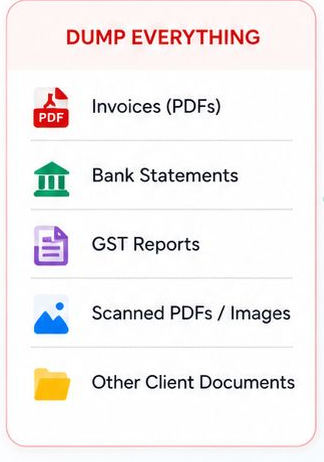
Point Harp at the folders where PDFs and images already arrive. New files enter the same repeatable processing flow.
Define the values you need once. Harp reads changing layouts and returns the same structured output shape.
Convert document data into consistent columns and rows instead of cleaning a different spreadsheet for every source.
Confidence signals and source references point operators to the values that deserve a second look.
Save templates and folder workflows, then run the next batch without rebuilding rules around every layout.
Send approved results to XLSX, CSV, JSON, and other practical formats your existing processes can use.
Accuracy
Harp handles recurring PDFs, phone photos, scans, tables, and forms whose layouts change while the data your process needs stays the same.
Confidence signals surface the documents and values that need human attention before data moves downstream.
Extracted records retain file and page context so reviewers can quickly check where a value came from.
Harp combines OCR and language models to capture headers, line items, transactions, and recurring sections across varied layouts.
Value
Model the output your process needs, connect the folder where documents arrive, and let Harp prepare structured results for review.

Excel-ready data out

Structured sheets
Clean rows in Excel.

Ready for review
Your team checks before use.
Share as usual
Download and send the Excel file.
Choose a representative file and define the fields, tables, and output structure the workflow needs.
Start with the data your downstream process expects.
Drop PDFs and images into a watched folder. Harp processes each file through the saved template.
Changing layouts produce one consistent output shape.
Check exceptions, approve the structured output, and move it into the spreadsheet or system used next.
People handle judgment; Harp handles repetitive document entry.
Test Drive
Upload an invoice, receipt, statement, or other recurring document and see the structured data Harp can prepare. No signup required.
Drop a file here or click to browse
JPEG, PNG, WebP, GIF, or PDF — up to 5 MB
3 free tries remaining
Data Handling
Harp keeps the handoff explicit: your team runs the desktop app, documents are transmitted securely for OCR and extraction, and the finished data returns for review. No misleading fully-local claim, and no extra dashboard for staff to babysit.
Keep the operating rhythm with your team while Harp handles the repetitive extraction step.
Document content is transmitted securely when Harp reads a file for OCR and field extraction.
The result returns as structured data your team can review, edit, reconcile, and archive.
Why Harp
Pick the recurring batch that creates the most copying, cleanup, and waiting. Prove the workflow there first.
Harp prepares structured records so operators spend time on exceptions and decisions instead of blank spreadsheets.
Reviewers can trace a value to its file and page before approving the data for downstream use.
Reuse templates and add credits as more teams, folders, and document types enter the workflow.
Use Cases
Start with the document stream that creates the most copying, cleanup, and waiting. Add more workflows after the first one proves useful.
See the PDF to Tally workflowExtract vendor, invoice, date, totals, tax, and line items before the data enters accounts payable or an operational tracker.
Turn phone photos and scanned receipts into consistent expense data for reimbursement, categorization, and reporting.
Extract transaction dates, descriptions, debits, credits, and balances from PDF statements before reconciliation or analysis.
Capture references, parties, dates, quantities, and shipment details from bills of lading and delivery paperwork.
Parse declarations, shipment support, product details, values, and dates into consistent fields for review and routing.
Turn onboarding forms, service reports, property documents, and recurring PDFs into records teams can search, review, and route.
Usage pricing
Start with 125 free credits. Fast extraction uses 1 credit per page; OCR and standard extraction use 5 credits per page. Credits never expire.
Start here
$10
500 credits · $0.020 / credit
For the first document workflow
500 credits
Credits never expire
All core features included
Credit pack
10% off$45
2,500 credits · $0.018 / credit
For regular document batches
2,500 credits
Credits never expire
All core features included
Credit pack
20% off$80
5,000 credits · $0.016 / credit
For multiple document streams
5,000 credits
Credits never expire
All core features included
Need more than 5,000 credits? Talk to us about a larger workflow.
Credits never expire
Credits can be purchased directly from the Harp desktop app.
Questions? Reach us at satya@querygen.ai · See our Refund & Cancellation Policy
FAQ
Practical answers for teams turning recurring PDFs and images into structured data.
Download
Download the desktop app, run real PDFs or images, and judge Harp by the structured, review-ready output it returns.
macOS 12 or later
Windows 10 or later
Includes 125 free credits. No credit card required.
Start with one document stream
Choose a recurring PDF or image, define the data you need, and turn the next batch into structured records your team can review and use.